Unity 3D Shader
Painterly Shader
Painterly Shader

Overview
Overview
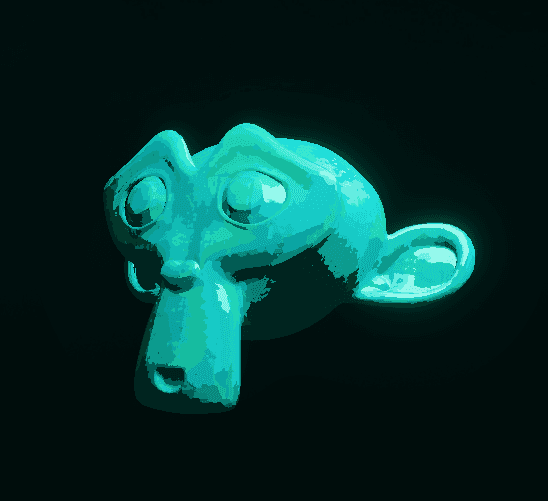
This shader was made in Unity using the Universal Render Pipeline, Shader Graph, and HLSL to implement a procedural Voronoi generator and a custom lighting model. It is a stylized painterly shader with a stroke made looking surface.
It has a high level of modularity, allowing control over Voronoi cell size, stroke noise, coloring, and custom lighting parameters to manipulate diffuse and specular lighting behavior.
This shader is based on the Voronoi generator used in my Crystal Shader. If you need insight into how this procedural generator works, I recommend visiting the Crystal Shader page and reading the Voronoi Generator section, as I won't be explaining its functionality on this shader page.
This shader was made in Unity using the Universal Render Pipeline, Shader Graph, and HLSL to implement a procedural Voronoi generator and a custom lighting model. It is a stylized painterly shader with a stroke made looking surface.
It has a high level of modularity, allowing control over Voronoi cell size, stroke noise, coloring, and custom lighting parameters to manipulate diffuse and specular lighting behavior.
This shader is based on the Voronoi generator used in my Crystal Shader. If you need insight into how this procedural generator works, I recommend visiting the Crystal Shader page and reading the Voronoi Generator section, as I won't be explaining its functionality on this shader page.

Voronoi Stroke Noise
Voronoi Stroke Noise
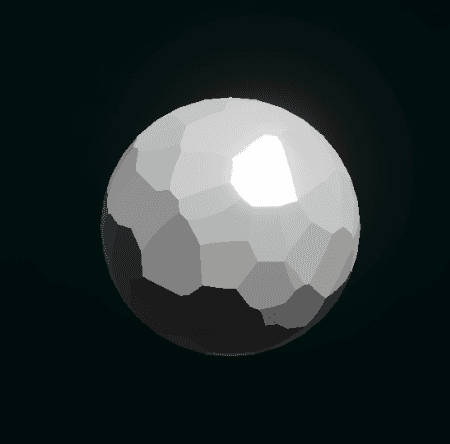
As seen in the Crystal Shader, outputting the feature position as the normal vector will result in groups of pixels that share the same normal, pointing toward their Voronoi cell feature point. We can tweak surface properties such as smoothness and metallic values to achieve a flatter and more stylized look.
To achieve a painterly surface, we need to add noise to the reference coordinates of the Voronoi Generator. By sampling a simple noise texture and manipulating parameters such as noise scale and strength, we can already see how the Voronoi cells adopt a stroke-like appearance.
As seen in the Crystal Shader, outputting the feature position as the normal vector will result in groups of pixels that share the same normal, pointing toward their Voronoi cell feature point. We can tweak surface properties such as smoothness and metallic values to achieve a flatter and more stylized look.
To achieve a painterly surface, we need to add noise to the reference coordinates of the Voronoi Generator. By sampling a simple noise texture and manipulating parameters such as noise scale and strength, we can already see how the Voronoi cells adopt a stroke-like appearance.


This noise sampling method, which uses only the mesh UVs, works well for properly unwrapped UVs, as they are generally uniform across the mesh surface. Nevertheless, this presents an issue for meshes whose UVs have not been properly unwrapped, as the noise will appear stretched and produce an undesired stroke effect.
To solve this problem, we can sample the noise using the fragment position in object space. We sample a simple noise texture three times, once for each pair of coordinates (XY, XZ, and YZ), and then use a geometric mean operation to average the three results.
With this alternative sampling method, we can eliminate this issue and make the stroke appearance independent of the mesh UVs. If your meshes have properly unwrapped UVs and you want to control the stroke noise sampling mode, you can add an enum keyword to switch between the available sampling methods.
This noise sampling method, which uses only the mesh UVs, works well for properly unwrapped UVs, as they are generally uniform across the mesh surface. Nevertheless, this presents an issue for meshes whose UVs have not been properly unwrapped, as the noise will appear stretched and produce an undesired stroke effect.
To solve this problem, we can sample the noise using the fragment position in object space. We sample a simple noise texture three times, once for each pair of coordinates (XY, XZ, and YZ), and then use a geometric mean operation to average the three results.
With this alternative sampling method, we can eliminate this issue and make the stroke appearance independent of the mesh UVs. If your meshes have properly unwrapped UVs and you want to control the stroke noise sampling mode, you can add an enum keyword to switch between the available sampling methods.
Color Variation & Blending
Color Variation & Blending
Now that we have defined the painterly-like surface, we can proceed to add color using a base color.
However, stroke based paintings often feature subtle variations in color and tone. To achieve this effect in our shader, we need to apply a consistent color tone variation to each stroke cell while allowing different tone variations between cells.
We can make use of the Cell Color output of the Voronoi Generator, which provides a unique value between 0 and 1 for each Voronoi cell. We can then define two blending colors and interpolate between them using the Cell Color output, achieving a unique color variation for each stroke cell.
Now that we have defined the painterly-like surface, we can proceed to add color using a base color.
However, stroke based paintings often feature subtle variations in color and tone. To achieve this effect in our shader, we need to apply a consistent color tone variation to each stroke cell while allowing different tone variations between cells.
We can make use of the Cell Color output of the Voronoi Generator, which provides a unique value between 0 and 1 for each Voronoi cell. We can then define two blending colors and interpolate between them using the Cell Color output, achieving a unique color variation for each stroke cell.


This could be considered the final step of the shader. However, we are currently using Unity's Lit Shader, which follows the PBR (Physically Based Rendering) workflow and introduces realistic diffuse, specular, Fresnel, and ambient occlusion lighting.
To achieve a more stylized look, we can implement our own custom lighting model that focuses only on diffuse and specular lighting. This approach allows us to expose a series of properties that provide finer control over the lighting behavior, making it easier to achieve a stylized appearance.
This could be considered the final step of the shader. However, we are currently using Unity's Lit Shader, which follows the PBR (Physically Based Rendering) workflow and introduces realistic diffuse, specular, Fresnel, and ambient occlusion lighting.
To achieve a more stylized look, we can implement our own custom lighting model that focuses only on diffuse and specular lighting. This approach allows us to expose a series of properties that provide finer control over the lighting behavior, making it easier to achieve a stylized appearance.
Custom Lighting Model
Custom Lighting Model
This custom lighting model includes only diffuse and specular lighting calculations, simplifying the overall shading model and contributing to a more stylized appearance. For diffuse lighting, it uses a Lambertian model, while specular lighting is calculated using the Blinn-Phong model. In addition, there are several properties to fine tune the lighting behavior. By focusing on these two lighting components and removing additional PBR effects, the shader gains a cleaner and more artistic look.
The normals generated by the Voronoi generator play a key role in achieving this effect. Reducing the smooth gradients typically produced by diffuse and specular lighting and creating distinct lighting regions that resemble individual brush strokes. Combined with the color variation and stroke shaped cells introduced in previous steps, these simpler lighting model gives the surface its final painterly appearance.
This custom lighting model includes only diffuse and specular lighting calculations, simplifying the overall shading model and contributing to a more stylized appearance. For diffuse lighting, it uses a Lambertian model, while specular lighting is calculated using the Blinn-Phong model. In addition, there are several properties to fine tune the lighting behavior. By focusing on these two lighting components and removing additional PBR effects, the shader gains a cleaner and more artistic look.
The normals generated by the Voronoi generator play a key role in achieving this effect. Reducing the smooth gradients typically produced by diffuse and specular lighting and creating distinct lighting regions that resemble individual brush strokes. Combined with the color variation and stroke shaped cells introduced in previous steps, these simpler lighting model gives the surface its final painterly appearance.